To quickly execute a few commands on the Domino Server console or monitor the server's activities via the "Live Console", you don't necessarily have to start the Domino Administrator.
A Domino Remote Console in the "regular" Notes Client?
Yes – it exists. However, it is not accessible through menu items or the like in the Notes Client.
The Remote Console always appears in the foreground, but it is NOT a modal window. The Notes Client can therefore continue to be used "as normal" while the Remote Console is displayed.
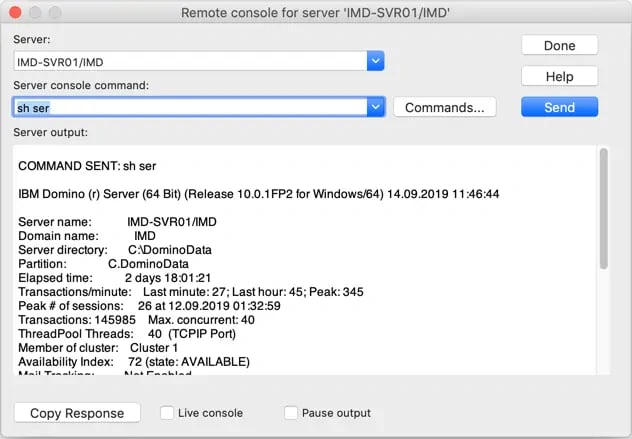
Remote Console in the Notes Client on macOS
How do I open this Remote Console?
The trick is to call the command:
@Command([AdminRemoteConsole])
from the Notes formula language repertoire.
I'm not a programmer – how do I call this command?
You can, for example, create a new SmartIcon and store the command there...
For a quick test, there's an even faster way (the method shown here is described in detail in the tip Built-in Calculator Function in the Notes Client):
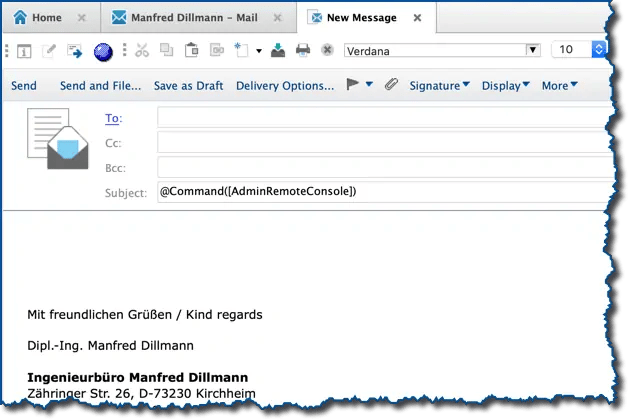
New mail in the Notes Client – @Command([AdminRemoteConsole]) in the subject line
- Create a new document or edit an existing document in any database (for example, a new mail).
- Enter the command @Command([AdminRemoteConsole]) in an empty field (not a rich text field).
- Press the keys "Shift" + "F9" (Shift key + F9).
- The Remote Console window will open on the screen.