You may have experienced this yourself: you created an additional location document for a POP account and entered the desired internet sender address there. By the next workday at the latest, this mail address has been replaced by the company mail address.
Cause
Responsible for this behavior of the Notes client is the DCC process (Dynamic Client Configuration), which Lotus has been using since release 5.x.
Through this, the service running as a background process at client startup "checks" whether settings are stored on the user's home server that do not yet exist on the client or exist in a different form. These settings are stored in the NAMES.NSF on the server and relate, in addition to the settings from the person documents (e.g. email address), primarily to the "User Configuration Profiles".
*Note: You can normally see the activities of the DCC in the local LOG.NSF (user log database).*
From an administrative perspective, this behavior is entirely intentional – it allows the desired client settings to be distributed "remotely" to the workstations. You can find more information in the administration help database.
Solution via a flag in the location document
Lotus has provided a way to disable the "updating" of the mail address without any tricks.
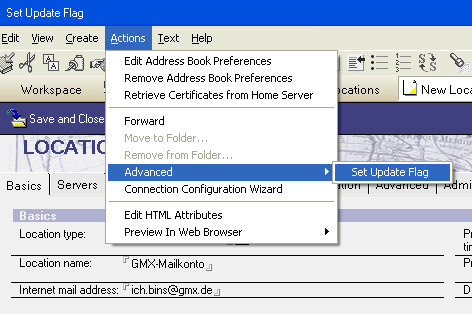
You must have the desired location document in your local NAMES.NSF opened in EDIT MODE. Now select the menu item shown below:
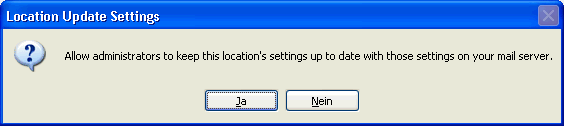
Confirm the dialog that now appears with "No". That's it.
Technical effect
In the location document, the field 'AcceptUpdates' is set to the value "0".