The Domino Server console command broadcast sends a message to all Notes Clients currently connected to that server — however, the message is only displayed in the status bar of the Notes Client. But there is a better way.
How can this be done better?
Normally, you use the Domino console command broadcast like this:
broadcast "Domino 10 Rocks!"
If you prepend the character sequence (!) to the message, a popup dialog with the corresponding message appears on the Notes Clients. Since it is a modal window that must be closed with an "OK" button, this is a sure way to get the attention of Notes users.
What does this look like in practice?
The broadcast command with the undocumented extension is entered at the Domino console:
broadcast "(!)Domino 10 Rocks!"
Result at the Domino console:

Entering the broadcast command with the undocumented extension at the Domino console
A corresponding popup dialog with the message appears on the Notes Clients:
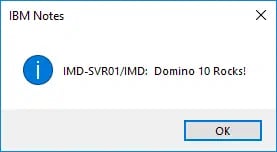
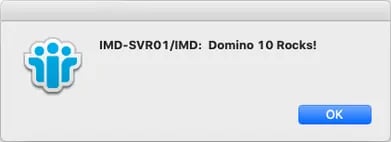
Notes
- It may take a few seconds for the popup dialog to appear on the Notes Client. If you open a database on the relevant Domino Server, the message usually appears immediately.
- If you do not have an open session on the "sending" Domino Server, the Notes Client will not receive the message.
- The broadcast command can also send messages specifically to certain or a single Notes user. I will not go into that here — you can find the relevant information in the Domino Administrator Help.