In some Notes/Domino applications, views need to display documents starting from a specific date or for a defined time range (time-dependent views).
It seems obvious to use a function like @Today in the view's selection formula, since it always returns the current time information.
A selection formula in a view such as
SELECT ReleaseDate <= @Today
ensures that only those documents are displayed whose 'ReleaseDate' field contains at least today's date. In other words: only documents whose release date has been reached are shown.
The problem with "normal" time-dependent views
When you open such a view in the Notes client, you will notice that the "refresh icon" (blue circular arrow) in the view no longer disappears, no matter how often you click on this icon with the mouse or alternatively press the 'F9' function key.
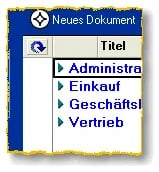
Permanently displayed refresh icon in a view
Why is that?
Although one might believe that the @Today function works only "day-precise", one has to keep in mind that an IT system generally only has a clock generator (timer component) and software may have to constantly check this time in order, for example, to determine which date the @Today function returns at the moment of query.
Therefore, in our example (view selection formula), one has to assume that immediately after the last refresh the displayed documents are no longer the temporally correct ones (example: a look at the view 1 second before or 1 second after midnight). That is why the Notes client constantly displays the refresh icon.
Drawbacks in the Notes client
When a user switches to such a view or opens a database in which this view is displayed, a noticeable delay before the documents appear occurs even with a comparatively small number of documents.
Since Notes constantly "feels" that the displayed documents are no longer up to date, the view index is updated for the affected view every time a client accesses it. Therefore, significant delays can occur even with just a few hundred documents. And if several users access the view virtually simultaneously, response times become increasingly worse.
Drawbacks on the Domino server
On the Domino server, the Indexer task (on Windows: NUPDATE.EXE) takes care of updating the views in the databases cyclically.
Since, after the initial build of a view index, the update is performed incrementally (i.e. an update to the view index only occurs when new or changed information needs to be displayed), the Indexer task can usually handle this task without problems.
However, if the Indexer task encounters a view in which time-dependent functions are used in the selection formula, an update is performed – even if no changes have been made to the documents themselves and no new documents have been created. This can have a very negative impact on server performance.
Remedy for the problem with time-dependent views
With a trick that seems unusual at first glance, the application developer can significantly improve the situation. If the view selection formula from the example above were programmed for an English Domino server in the form:
SELECT ReleaseDate <= @TextToTime( "Today" )
or for a German Domino server in the form
SELECT ReleaseDate <= @TextToTime( "Heute" )
all the problems mentioned above would be fixed (at least for active use in the Notes client). The formula works because the terms "Today" or "Heute" are valid arguments for the @TextToTime function. To account for the language version of the server being used, the formula could be extended as follows:
Today_DE := @TextToTime( "Heute" );
Today_US := @TextToTime( "Today" );
Today_FR := @TextToTime( "Aujourd\'hui" );
Today :=
@If(
    Today_DE > [01.01.1900]; Today_DE;
    Today_US > [01.01.1900]; Today_US;
    Today_FR
);
SELECT ReleaseDate <= Today
This way, the view selection formula works flawlessly with a German, English, and French Domino server. Just give it a try…
Issues
When using this technique for active work with a Notes client in the views, there are absolutely no problems – the view is "blazingly fast" and the application developer has the feeling of having achieved a "milestone" in Domino development… 🙂
However, there is a really nasty trap which I only discovered myself when using this technique in the databases of my website:
What doesn't work?
If you use a view selection formula in the above form in views which are NOT actively accessed from a Notes client, no update of the view index occurs and, for example, in a browser no additional documents are displayed that actually satisfy the view selection formula's condition.
On my website, I observed this with documents from the "Tips & Tricks" section, for example. Here, a "Release" field actually exists in the documents, through which I control the display of the documents on the web. If, for example, a display date was set for a document 2 days in the future, those documents were unfortunately NOT displayed on the web on the intended day…
I cannot explain with certainty what exactly causes this behavior – however, a causal connection seems to exist with the – admittedly somewhat unusual – use of the @TextToTime("Heute") function.
Solution
Through testing, I have found that rebuilding the view indexes via the UpdAll task provides a remedy.
But please do not believe that the UpdAll task which is started nightly at 02:00 AM by the line
ServerTasksAt2=UpdAll
in the Domino server's NOTES.INI would already bring the solution.
Only by using the "-R" parameter (Rebuild), which forces a complete rebuild of the views, did the desired behavior appear. Since the "-R" parameter causes an extremely server-intensive and time-consuming rebuild of the views, it should under no circumstances be applied to all databases.
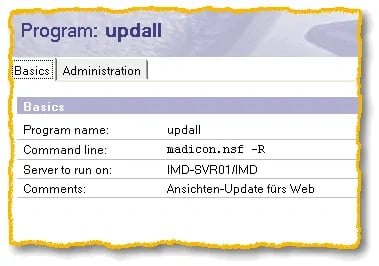
Program document, UpdAll -R for a specific database
As a solution, a program document is recommended which, for example, exactly at midnight (the example is about replacing the @Today function) starts the UpdAll task with the -R parameter, applied only to a specific database.