Although information about the ROBOT Attack was already published in mid-December 2017, IBM has not yet delivered a fix to secure the HTTP task. However, you can protect your IBM Domino Server against such attacks yourself.

What Is the ROBOT Attack?
There is an interesting article on heise Security with background information on the ROBOT Attack (Return of Bleichenbacher's Oracle Threat).
For the ROBOT attack to succeed, a server must use TLS in combination with RSA encryption during key exchange including PKCS #1 1.5. If this is the case, attackers could exploit the Bleichenbacher vulnerability and guess the session key via brute-force attack. If successful, recorded traffic can be decrypted. The private key is not compromised.If a server relies exclusively on RSA, the attack is disastrous. However, this should no longer be the case today. Diffie Hellman on elliptic curves (ECDH) should be used for the key exchange. Often, RSA is still active on servers as a fallback. When Forward Secrecy is in use, a ROBOT attack is still conceivable according to the security researchers, but more difficult to execute.
Is My IBM Domino Server Affected by the ROBOT Attack?
If your Domino Server is directly accessible from the internet and runs with the default configuration, this is likely the case. I tested my IBM Domino Server (mobil.madicon.de) as follows.
robotattack.org
At https://robotattack.org you can test your IBM Domino Server for a possible vulnerability by entering the URL.
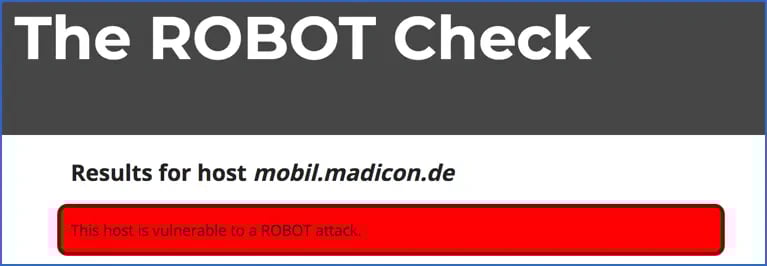
This is the result of my IBM Domino Server with the default configuration.
Qualys SSL Server Test
Qualys also provides (alongside many other important details about your certificate) a statement on the potential vulnerability of your IBM Domino Server through the SSL Server Test.
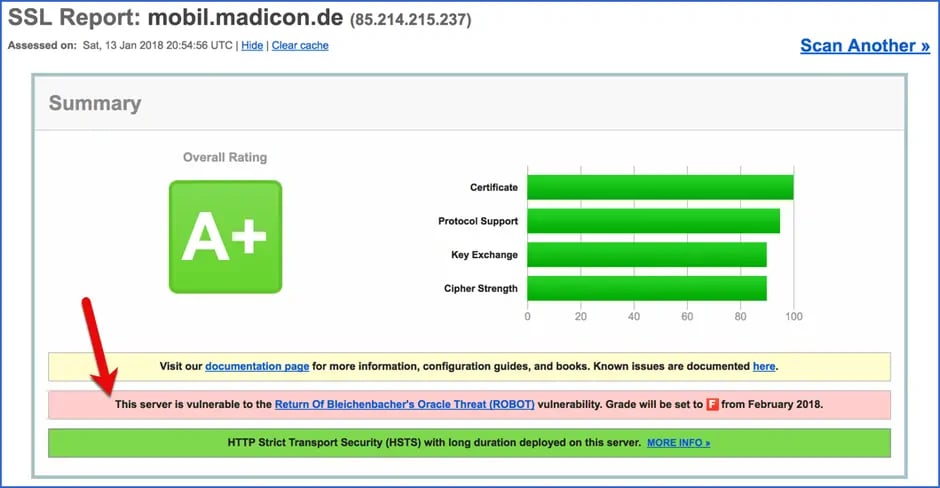
This is the Qualys result for my IBM Domino Server with the default configuration. Also noteworthy is the warning that unprotected web servers will only receive a Grade "F" from February 2018 onwards.
Approach
As long as IBM has not yet delivered a fix, you need to take action yourself. The heise Security article recommends the following workaround.
If you are using technology that is vulnerable and for which no patches are available, you should disable RSA encryption. This includes all ciphers with the designation TLS_RSA.
Solution for the Domino Server
Since IBM Domino 9.0.1 FP5, the ciphers used by the IBM Domino Server can be controlled through a NOTES.INI entry on the server.
Which Ciphers Does the IBM Domino Server Use in the Default Configuration?
IBM Domino Server version 9.0.1 FP5 and later uses the following default cipher list for TLS 1.2:
- ECDHE_RSA_WITH_AES_256_GCM_SHA384 (C030)
- DHE_RSA_WITH_AES_256_GCM_SHA384 (009F)
- ECDHE_RSA_WITH_AES_128_GCM_SHA256 (C02F)
- DHE_RSA_WITH_AES_128_GCM_SHA256 (009E)
- ECDHE_RSA_WITH_AES_256_CBC_SHA384 (C028)
- DHE_RSA_WITH_AES_256_CBC_SHA256 (006B)
- ECDHE_RSA_WITH_AES_256_CBC_SHA (C014)
- DHE_RSA_WITH_AES_256_CBC_SHA (0039)
- ECDHE_RSA_WITH_AES_128_CBC_SHA256 (C027)
- DHE_RSA_WITH_AES_128_CBC_SHA256 (0067)
- ECDHE_RSA_WITH_AES_128_CBC_SHA (C013)
- RSA_WITH_AES_256_GCM_SHA384 (009D)
- RSA_WITH_AES_128_GCM_SHA256 (009C)
- RSA_WITH_AES_256_CBC_SHA256 (003D)
- RSA_WITH_AES_256_CBC_SHA (0035)
- RSA_WITH_AES_128_CBC_SHA256 (003C)
- RSA_WITH_AES_128_CBC_SHA (002F)
- RSA_WITH_3DES_EDE_CBC_SHA (000A)
Following the recommendation from heise Security (see above), the ciphers beginning with RSA_ should be removed. You can control the ciphers used by the IBM Domino Server through an entry in the NOTES.INI file and thus protect your Domino Server against the ROBOT Attack.
Setting the Desired Ciphers in the IBM Domino Server's NOTES.INI
From IBM Domino version 9.0.1 FP5 onwards, the desired ciphers can be set using the NOTES.INI variable
SSLCipherSpec=...
The desired ciphers (= the hex code in parentheses) are always specified as 4 digits (including leading zeros) directly concatenated. To use the ciphers 1 through 11 listed above, enter the following command at the Domino console:
set config SSLCipherSpec=C030009FC02F009EC028006BC0140039C0270067C013
The entry is immediately written to the NOTES.INI file. For the new ciphers to take effect, the HTTP task must be restarted.
tell http restart
The effectiveness of the NOTES.INI entry should be confirmed by the following console message during the HTTP task restart.
SSLCipherSpec setting in notes.ini file will override settings from Domino Directory
Conclusion
With the settings above, my IBM Domino Server is now apparently protected against the ROBOT Attack.
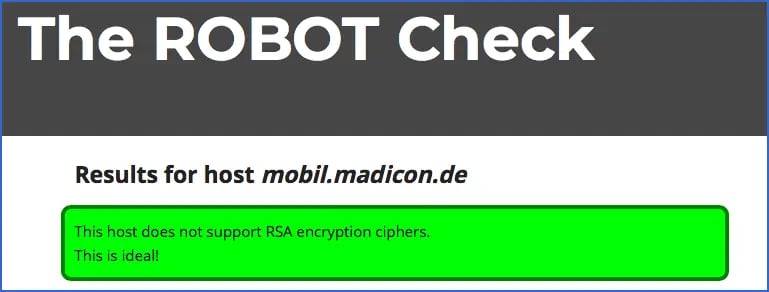
Older clients may have a problem if they support neither DHE (Diffie Hellman key exchange) nor ECDHE (Elliptic Curve Diffie Hellman key exchange) encryption. However, the proportion of such clients should be small today. Modern TLS connections use DHE/ECDHE and only require RSA for signatures.
But as always: Security comes first!