Every Notes developer knows this situation: you have temporarily used a few fields in a form for testing purposes. Later, these fields are removed from the form. Nevertheless, these field names apparently remain in the database "forever".
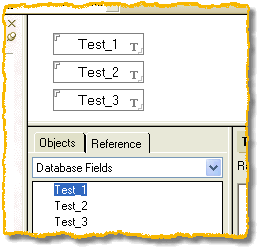
Form with test fields opened in the R5.x Designer Client
Technical background
Whenever a new field is added to the database, Notes adds it to the internal UNK table (= UNique Key Table). The Unique Field List derived from it is shown in R4.x in the Fields and Formulas dialog box and, starting with R5.x (as seen in the image), on the Reference tab.
Notes considers the following to be "adding a field to a database":
- adding a field to a design element (e.g. a form)
- adding a field to a document (e.g. while running an agent)
- pasting a document containing fields with new field names into a database (e.g. via the Windows clipboard)
If the field in question is later deleted, it still remains in the Unique Field List until the database is compacted. During the Compact process, all existing documents and design elements are examined and the Unique Field List is brought up to date.
Caution!
If the database has a full-text index, the fields will NOT be removed.
Solution
You should perform the following steps to successfully remove the fields that are no longer in use.
- Delete the fields from all documents in the database
- Delete the fields from all forms and subforms in the database
- Delete any existing full-text index of the database
- Compact the database using the -c option (copy-style compaction)
- Use the following syntax at the Domino server console:LOAD COMPACT database.nsf -c(path information – as always with server console commands – relative to the Domino data directory)
Note
In rare cases it has been observed that – due to a corrupted subform in the database – the procedure described above did not work.
In this case, create a new subform with any name, transfer the existing fields and other contents via the clipboard, delete the original subform, and rename the new subform to the previously used name.