New databases created from a template (.ntf file) with a predefined ACL? This is possible through special ACL entries in the template used.
How Does It Work?
All entries in a template's ACL that are enclosed in square brackets (e.g. [-Default-]) will be transferred — without the square brackets — to the ACL of any database created from that template, along with the corresponding properties (access level, user type, selected attributes, and roles).
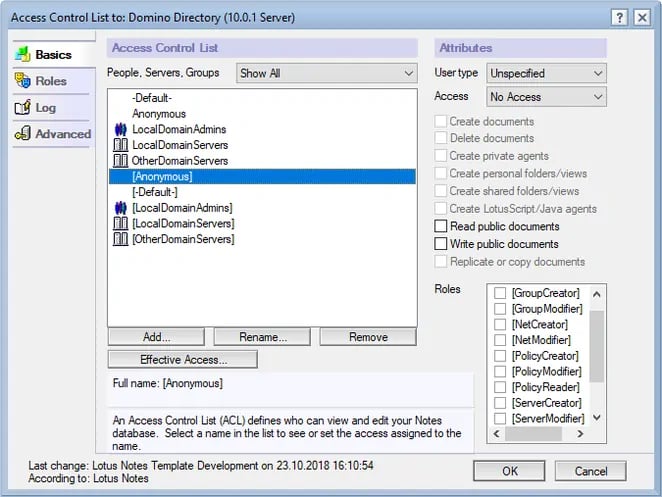
ACL of the Domino 10.0.1 Template (pubnames.ntf)
If you prepare your templates with entries like:
[LocalDomainServers]
[OtherDomainServers]
[LocalDomainAdmins]
administrators and servers will immediately have the appropriate rights in the newly created databases.
With the two entries:
[-Default-]
[Anonymous]
the desired "baseline security" for the newly created database is ensured.
Note
Don't be confused: the ACL entries in the screenshot above WITHOUT square brackets [] are intentional and control access to the template itself.
Don't be confused: the ACL entries in the screenshot above WITHOUT square brackets [] are intentional and control access to the template itself.
Wildcard ACL Entries
In database ACLs, wildcard entries (also called joker or placeholder entries) are a built-in option to control access based on the organizational unit or organization level of the accessing user or server ID.
Examples
*/HCL
*/Marketing/HCL
Such entries may also be enclosed in square brackets (
[*/Marketing/HCL] ) and added to the ACL of templates as described above.