In the Release 6 client there is a fairly simple way to display the entire MIME/HTML content of an internet mail. This allows you, for example, to view the rather interesting routing information.
The cumbersome approach
Under Release 5.x (and of course the even older Notes versions), this could only be viewed directly in the Notes client via the document properties, without any additional programming.
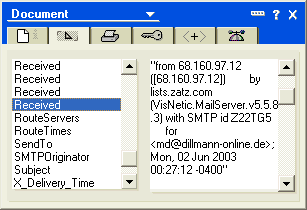
Routing information in the „Received“ fields
As an alternative, under version 5.x an export of the mail as Structured Text is also possible. In this case the contents of all fields are saved to a TXT file.
Direct display of the MIME content starting with Release 6
Starting with Release 6, the entire MIME/HTML information can be displayed as a complete image of the internet mail. To do so, open the received mail and select the menu item shown below.
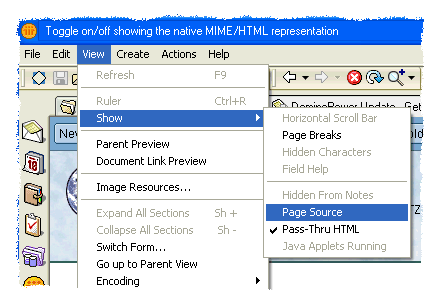
A new document now opens in the Notes client (example):
X-Envelope-From:
X-Envelope-To:
X-Delivery-Time: 1054528339Received: from lists.zatz.com ([68.160.97.12])
by mailin.webmailer.de (8.12.8/8.8.7) with ESMTP id h524VxAj019121
for ; Mon, 2 Jun 2003 06:32:00 +0200 (MEST)
Message-Id: <200306020432.h524VxAj019121@mailin.madicon.de>
Received: from 68.160.97.12 ([68.160.97.12])
by lists.zatz.com (VisNetic.MailServer.v5.5.8.3) with SMTP id Z22TG5
for ; Mon, 02 Jun 2003 00:27:12 -0400
X-Mailer: ZATZ ZENPRESS 3.0 (Windows 2000 Server)Mime-Version: 1.0
Date: Mon, 02 Jun 2003 04:27:12 GMT
To: „Manfred Dillmann“
From: „DominoPower Magazine“
Sender: dominopower+md=madicon.de@lists.ZATZ.com
Errors-To: dominopower+md=madicon.de@lists.ZATZ.com
Subject: DominoPower Update – Getting to Your Workspace
X-MIMETrack: Itemize by SMTP Server on IMD-SVR01/IMD(Release 6.0.1CF1|March 04, 2003) at
06.02.2003 07:00:07,
Serialize by Notes Client on Manfred Dillmann/IMD(Release 6.0.1CF1|February 07, 2003) at
09.06.2003 18:07:08,
Serialize complete at 09.06.2003 18:07:08
Content-Type: text/html; charset=“us-ascii“
Important note
This form of display is of course only possible if the email was actually stored in MIME format in the recipient's mail database. This can be configured individually for each Notes user in the person document.

„Basic“ tab -> „Mail“ section in the person document
If the option „Prefers Notes Rich Text“ is set here, every received email is converted by the router task into the native Notes rich text format – a display as MIME/HTML is then no longer possible.