When documents are deleted from Domino databases, the freed disk space is reused for new records, but some "air" — the so-called "white space" — always remains. Therefore, all databases should be compacted periodically. However, this doesn't work for all databases while the Domino Server is running.
Where Is the Problem?
Databases that are permanently opened by the Domino Server itself (e.g., names.nsf, the Domino Directory) unfortunately cannot be compacted while the server is running — at least not with the parameters "-c" or "-B", which actually reduce the size of the database.
The COMPACT command terminates in both cases with a corresponding message.
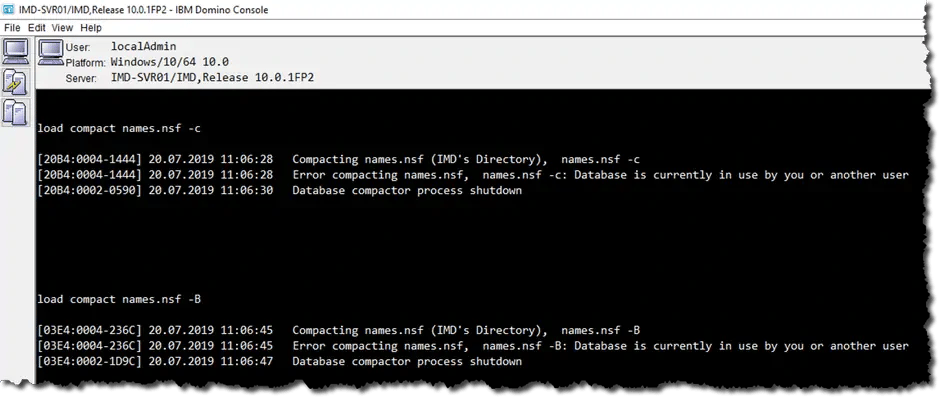
The "load compact" command at the Domino Console
Is There a Way to Do It Anyway?
Yes. You need to stop the Domino Server and then call the compact task from the operating system's command line.
The following instructions apply to the Windows operating system.
What Steps Need to Be Performed?
- Stop the Domino Server (e.g., 'quit' at the Domino Console)
- Open a command prompt window at the operating system level
- Navigate to the Domino program directory (not the Data directory)
- Type the command 'ncompact.exe names.nsf -c'
- If prompted, enter the password for the server ID
- Once the process is complete, details about the recovered disk space (= reduction in the .nsf file size) will be displayed.
If transaction logging is enabled on your Domino Server, you should be careful when using the compact command with the '-c' and '-B' parameters. The compacted database will then receive a new DBIID (Database Instance ID) — this can affect your backup. Details on this topic can be found in the Domino Administration help documentation.
Explanation
All tasks normally invoked on the Domino Server via the 'load' command exist as executable program files on the hard drive. On the Windows operating system, the file name is prefixed with the letter "n" before the task name used at the Domino Console.
This means other Domino Console commands, such as fixup or updall, can also be called from the operating system.
Special Considerations
Not all tasks invoked at the Domino Console (e.g., fixup) report an error when accessing files opened by the Domino Server itself, as the compact command does. Some tasks may terminate without having completed their "work".
Example
When attempting to run the fixup command on names.nsf (Domino Directory) while the server was running, the task terminated without any error message. When the command was subsequently called using the procedure described above, it reported that "a document header was repaired and that this document would replicate correctly in the future".
When attempting to run the fixup command on names.nsf (Domino Directory) while the server was running, the task terminated without any error message. When the command was subsequently called using the procedure described above, it reported that "a document header was repaired and that this document would replicate correctly in the future".
It is obviously worthwhile, when experiencing problems with Domino databases that have no other explanation, to run a Domino Server task from the operating system's command line.