In the third part of this tip we look at the "Cancel and Close" action button. Well – you might think – where is the problem? One @Command statement and we're done…

The problem with this kind of action button
Most developers would probably use the following formula straight away:
@Comamand([FileCloseWindow])
Does this always work? Is the window closed no matter what, discarding any changes that may have been made?
That is exactly what this formula does NOT do.
As soon as the end user has entered even a single character into a field of a new document – or alternatively has made a change to a field of an existing document – the Notes client always asks whether you want to save those changes.
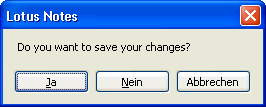
In principle this behavior of the Notes client is fine. In practice, it prevents you from losing potentially important, changed and not yet saved data.
But the action button is called "Cancel and Close" – whoever clicks it does not expect to be asked whether they really want to cancel. 😉
Solution
The following formula code produces the desired behavior in the Notes client. After clicking the action button – no matter what has been changed in the document – there are guaranteed to be no further prompts. The window is simply closed – exactly what the user expected.
FIELD SaveOptions := "0";
@Command([FileCloseWindow])
How does this work?
The field name "SaveOptions" is a reserved system field name. Notes actually associates certain functions or behaviors with certain field names automatically.
Most of these field names originate from the area of mail routing (SendTo, CopyTo, BlindCopyTo, DeliveryPriority, Encrypt, ReturnReceipt, etc.) – but that does not mean you may only use these fields in that context.
The rule is quite simple:
As soon as such a field with a specific value (see the Designer Help DB for details) is present in the form (or in our example: in the document), Notes will react accordingly.
For the SaveOptions field, the field value means:
"1" – the document will ALWAYS be saved, and
"0" – the document will NEVER be saved
"0" – the document will NEVER be saved
Exactly the second variant (please do not use a numeric 0) is used in our formula.
During the execution of the formula, we add a field 'SaveOptions' with the value "0" to our document. For Notes this means: nothing will be saved. After that, the statement @Command([FileCloseWindow]) is executed.
So the form is closed WITHOUT any further prompt – just as intended.