In the second part of this tip we look at the action button "Save and Close". Well – you might think – where's the problem? Two @Command statements and we are done…

The problem with this kind of action button
Most developers would spontaneously use the following formula:
@Command([FileSave]);
@Command([FileCloseWindow])
At first glance this looks correct and in most cases it will work. However, it becomes problematic when the form uses validation formulas for some fields and the user has not filled in the affected fields completely and/or correctly.
With a newly created document, for example, Notes reacts differently depending on the version in use:
R4.x
Due to the invalid validation in one or more fields, the Notes client is unable to save the document. The second instruction (to close the window) is nevertheless executed – without regard for the consequences. And the R4 client often ruthlessly carried this out.
Result:
The form disappears from the screen and all previously entered data is lost.
R5.x and ND6.x
Because of the invalid validation, the Notes client is likewise unable to save the document. When the instruction to close the window is executed afterwards, the more recent versions of the Notes client are at least friendly enough to ask the user via a dialog whether to save the record.
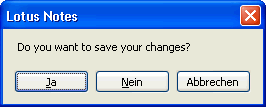
Result:
The end user is confused. If they have the feeling "… I have just saved" and choose the button "No", the Notes client closes the form and, as with R4.x, all entered data is lost. If they use the "Yes" button, the user ends up in a "validation loop" and will quickly lose patience…
Solution
The following formula code only executes the command @Command([FileCloseWindow]) if the save instruction beforehand was successful – that is, no field has a validation problem.
@If(@Command([FileSave]);
  @Command([FileCloseWindow]);
  ""
)
The formula can be read as follows:
If the save was carried out successfully (in that case the command @Command([FileSave]) internally returns a logical 'true' to the @If function), then the command to close the window is also executed – otherwise nothing happens ( "" = two quotation marks, alternatively also NULL).
Notes client behavior (all versions):
An invalid validation in a field still prevents the document from being saved – exactly as intended by the developer.
After the end user has read the field validation message (usually coming from the @Failure function) and confirmed it with a mouse click, the cursor is placed in the affected field and the missing or incorrect entry in the field can be corrected.
Afterwards another attempt at Save and Close can be made.